If you’ve read the headline and think that ten sounds like an awful lot of different binary-number formats, perhaps you are guessing that it includes floating point, or ones’ complement and other archaic representations, but no, this is all about what’s in common current use, all integers, and all based on two’s complement. This post explains how the various formats are used in audio software, and has some tips for converting between them. There are three dimensions: signedness, endianness, and padding.
Signedness
I think the most sensible way of understanding two’s complement – the dominating signed representation – is to first consider subtraction with a positive result and then apply the same rules when crossing the zero line into the negative numbers. Subtracting one from an odd positive number (whose least significant bit is 1) just means flipping the lowest bit to 0.
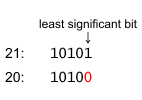
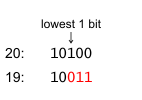
In an even number (whose least significant bit is 0) you find the lowest 1 bit, flip it to 0, and flip all the 0 bits below it to 1. (Actually, if you think about it, the latter rule works for odd numbers as well.)
It makes sense to think of nonnegative numbers as padded with an infinite number of 0 digits to the left (like we are used to from decimal numbers), and negative numbers as padded with an infinite number of 1s. So when subtracting one from zero, you can think of it as flipping the whole infinite sequence of zeros up to the nonexistent lowest 1 bit, which would have been flipped to 0 if it had ever been found.
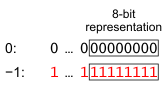
In a signed b-bit representation, the stored bits are the lower b bits of the padded number, so the sign bit, the most significant of the stored bits, is just one of the left-padding bits. Hence, it’s 1 for negative numbers and 0 for nonnegative.
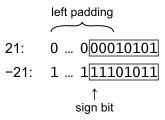
If the magnitude of the number is so large that the most significant of the b bits is not one of the padding bits, it means we need more than b bits to represent that number. The wonderful thing about two’s complement is of course that as long as the numbers stay in range, the same rules for binary arithmetic apply without thinking about whether the numbers are positive or negative.
In PCM audio, numbers are amplitudes, so it makes sense from a signal-processing point of view if they are stored as signed, and most commonly they are. But not always: for instance the WAV format peculiarly uses unsigned numbers if the bit depth (the number of bits per sample) is 8, but signed for greater bit depth.
Conversion
To convert a signed b-bit number to unsigned or vice versa, you add or subtract \(2^{b-1}\), or equivalently flip the sign bit with an xor operation. So to change x from signed to unsigned or the reverse, just do:
x ^= 1 << b-1
Beware that in C, these kinds of operations should always be done with values declared to be unsigned, because it’s undefined what happens when a signed integer overflows beyond its range.
Endianness
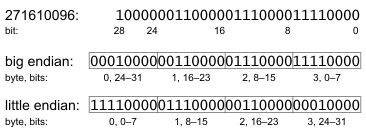
Memory and file addresses refer to octets of bits, also known as bytes, so for instance a 32-bit integer consists of four bytes, each with its own address. The order of those addresses can be either little endian, where the lowest address holds the least significant byte, or big endian where it’s the reverse. Both make sense in different contexts: little endian extends more naturally to how bits are addressed (bit 0 is the least significant and bit 7 the most significant bit of a byte), but with big endian, integers are byte strings in lexicographic order.
Conversion
CPUs often have instructions to reverse endianness, which in C on most Unix-like systems can be accessed through macros found in endian.h. For instance, be32toh converts (if necessary) a big-endian 32-bit integer to the host representation and htobe32 the reverse. In macOS, the corresponding macros have names like OSSwapBigToHostInt32, and can be found in architecture/byte_order.h.
Integers can be composed from bytes using shift and or operations. For instance the following reads a 24-bit value from position i in a byte array buf:
buf[i] << d0 | buf[i+1] << 8 | buf[i+2] << d2
If buf is little endian, d0 should be 0 and d2 16, and the reverse if buf is big endian.
In Java, ByteBuffer has an order method to specify the endianness of the underlying array, which guides methods like getInt and putInt. If you look into the implementation, you’ll find that native methods in jdk.internal.misc.Unsafe do the actual memory access. But there are no methods for 24-bit (3-byte) numbers, so they have to be composed with shift and or.
Padding
The number of bits used for a binary number doesn’t have to be a multiple of 8, but a memory address or file position always refers to a whole octet. Therefore, values are often padded with extra bits up to the closest multiple of 8. Also, 24-bit numbers may be padded with 8 bits to the next standard integer size of 32 bits. But then you have to decide which of the expanded number of bits are to be significant and which are to be padding, and also what value the padding bits should have. I have found three choices used in different contexts, or four if you count not supporting padding at all.
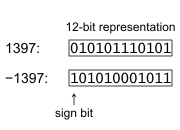
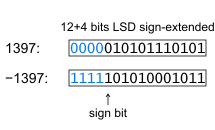
As a running example, figures show how the numbers 1397 and −1397 are padded from 12-bit representation to 16 bits.
MSD
I think the most sensible choice is to place the significant bits in the most significant digit (MSD) positions, and set the padding bits in the least significant positions to zero. The sign bit (if the representation is signed) ends up where it’s supposed to be, and if data is sent to a recipient that can’t handle padding, it works to just lie by giving the number of bits after padding. Then to the recipient, it looks like the lowest bits just happen to always be zero.
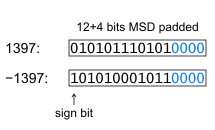
The LAME API expects samples to be delivered this way. Also, it may work in WAV files, depending on what software reads them. WAV is a Microsoft format, and its specifications can make you think of the old joke about how many Microsoft employees it takes to change a light bulb. (None, they just define darkness to be the new de facto standard.) There is no requirement that the bit depth should be divisible by 8, but the assumption seems mostly to be that it is, except in this section on page 3-25 of the joint IBM and Microsoft specification version 1.0 from 1991:
Each sample is contained in an integer i. The size of i is the smallest number of bytes required to contain the specified sample size. The least significant byte is stored first. The bits that represent the sample amplitude are stored in the most significant bits of i, and the remaining bits are set to zero.
For example, if the sample size (recorded in nBitsPerSample) is 12 bits, then each sample is stored in a two-byte integer. The least significant four bits of the first (least significant) byte is set to zero.
However, the Microsoft “standards update” document from 1994, versioned as 3.0, makes no mention of this. Generally, you can’t expect that software can handle padding in WAV files, but MPlayer can, as well as Klipspringer. Later, Microsoft has defined an extensible format that requires the number of bits per samples to be a multiple of 8, but then adds a specification for the actual “valid” number of bits. The Klipspringer WAV decoding class supports the extension since version 4.0.7, but klipcook still produces WAV files without it. (Maybe I’ll change it some day, but for now the previous standard works for me.)
Conversion
To move the a b-bit bumber from LSD to MSD positions in a variable x with a word size of w bits, just shift it w−b bits to the left (and again in C, make sure x is unsigned).
x <<= w-b;
LSD with zero padding
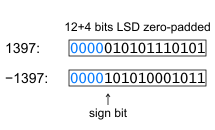
Positioning the significant bits in the least significant digit (LSD) positions, with unused more significant bits set to zero, seems to be the standard with the ALSA API for instance.
The ALSA header file pcm.h has:
/** PCM sample subformat */
typedef enum _snd_pcm_subformat {
    /** Unknown */
    SND_PCM_SUBFORMAT_UNKNOWN = -1,
    /** Standard */
    SND_PCM_SUBFORMAT_STD = 0,
    /** Maximum bits based on PCM format */
    SND_PCM_SUBFORMAT_MSBITS_MAX = 1,
    /** 20 most significant bits */
    SND_PCM_SUBFORMAT_MSBITS_20 = 2,
    /** 24 most significant bits */
    SND_PCM_SUBFORMAT_MSBITS_24 = 3,
    SND_PCM_SUBFORMAT_LAST = SND_PCM_SUBFORMAT_MSBITS_24
} snd_pcm_subformat_t;
That indicates that the standard, “STD” is not the most significant bits, because the MSBITS constants serve as the exception to prove the rule. I haven’t seen it clearly specified anywhere, but both ALSA and the Java sound system seem to default to zero-padded LSD format, and therefore raw data files recorded by Klipspringer also have this format.
Conversion
Usually nothing needs to be done to get this format, but obviously you need to shift right if going from MSD. Sometimes you may need to mask off the top w−b bits from a b-bit number in a variable with word size w, for instance like this:
x &= (1 << w-b)-1 << b;
LSD with extended sign
If samples captured in LSD with zero padding are directly sent as input to the libFLAC encoder, the process crashes, apparently due to an unchecked out-of-range error. Surprising, but not altogether unreasonable. Signed b-bit numbers can have values from \(-2^{b-1}\) to \(+2^{b-1}-1\) and if negative numbers are padded with more significant 0s they go out of range when interpreted as having more than b bits. For instance, 12-bit signed numbers range from −2048 to +2047. As you can see in the zero-padded LSD illustration, −1397 viewed as a 12-bit binary number padded with four 0s makes the 16-bit pattern 0000101010001011. But interpreted as a 16-bit number, that bit pattern is 2699, which is out of range. In order to keep its value as a 16-bit number, it needs to be padded with four 1s instead. As mentioned above, it makes sense to regard negative numbers as padded with an infinite number of 1s to the left.
Conversion
To pad a b-bit zero-padded LSD number with 1s if it’s negative, you can extend the sign bit like this:
x |= -(x & 1 << b-1);
Raw file formats
Disappointingly, SoX, my favorite tool for most audio processing, cannot handle any padding at all, but requires all bit depths to be multiples of 8 and 24-bit samples to be held in three (not four) bytes. So I cannot rely on SoX for conversions of recorded audio, and therefore Klipspringer includes the klipcook command to convert from raw to other formats.
Both klipcook and the Klipspringer hub expects the format to be specified in the file name using SoX command-line syntax. For instance, a filename
Song -r 48000 -b 16 -c 2 -e signed-integer -L.raw
is in 48 kHz, 16-bit stereo signed little-endian encoding. Bit depths with padding is specified as significant bits “+” padding bits, for instance “-b 12+4” for 12-bit samples padded to 16 bits (in LSD zero-padded format), and “-b 24+8” for 24-bit samples padded to four bytes each.
Summing up
Combining the three dimensions where applicable, the ten formats we get are:
- unsigned, big endian, MSD,
- unsigned, little endian, MSD
- unsigned, big endian, LSD,
- unsigned, little endian, LSD,
- signed, big endian, MSD,
- signed, little endian, MSD,
- signed, big endian, LSD, zero padded,
- signed, little endian, LSD, zero padded,
- signed, big endian, LSD, sign-extended, and
- signed, little endian, LSD, sign-extended.